Does a Smart Thermostat Work Without a C-Wire?
Often yes — but it depends on your system. How to check whether you already have a C-wire, the four ways to add continuous power, and the systems where none of them apply.
- Usually yes — many smart thermostats draw enough power through the existing wires, but heating-only, cooling-only, zone-controlled and heat pump systems may still need a C-wire or power accessory.
- Four fixes exist where one is needed: a manufacturer power module, a power-extender kit at the furnace board, a plug-in 24V transformer, or running a real C-wire.
- Never identify a wire by its color — always by the terminal letter it connects to.
- Line-voltage, millivolt, dual-transformer and communicating systems are not compatible with any of these fixes.
- Turn off power at the breaker or furnace switch before touching any thermostat wiring.
On this page
This is the most common smart-thermostat question, and the honest answer is less absolute than most articles suggest. Many systems power a smart thermostat fine without a C-wire. Some genuinely can't. The useful work is figuring out which one you have before you buy anything.
What a C-wire actually does
The C-wire — short for common — completes a circuit back to the transformer so the thermostat receives continuous 24V power. Google states the point plainly: a C wire doesn't control heating or cooling functions, it only provides constant power to your thermostat.
Older mercury and dial thermostats needed no power of their own. A smart thermostat runs a display, a radio, and sometimes sensors around the clock, so it needs a steady supply. Where there's no C-wire, many models draw a small amount of power through the heating and cooling wires instead — Google notes Nest thermostats are designed to use very little power and in many cases can get enough this way. It works until it doesn't.
How to check whether you already have one
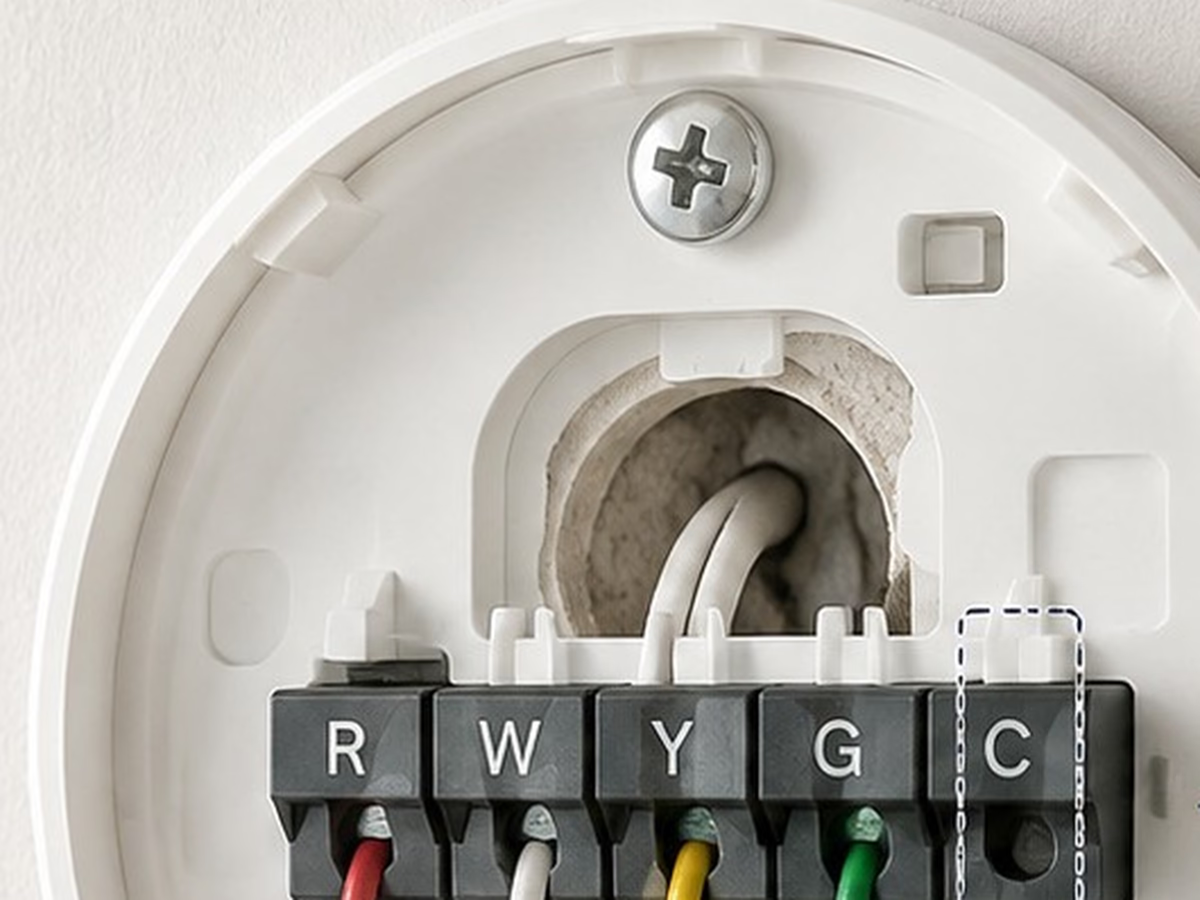
With the power off, ease the thermostat face off its wall plate and photograph the terminal block before touching anything. You are reading letters, not colors.
- Look for a wire seated in the terminal marked C. If one is there and connected, you already have a C-wire and most of this guide doesn't apply to you.
- Check for an unused conductor pushed back into the wall cavity. Cables are often run with five conductors and wired with four, which means a spare may already be sitting there.
- Write down every terminal letter that has a wire in it — R, Rc, Rh, W, Y, G, C and any others — and label each wire with its letter before you disconnect it.
- Confirm the letters against your system's own documentation or the labels on the furnace control board, since not every system labels the 24 VAC common as C.
Options when there's no C-wire
1. The power module included with the thermostat
Several manufacturers sell or bundle an accessory that supplies continuous power without running a new wire — Google's Nest Power Connector is the best-known example. It's the manufacturer-supported route, which matters if you ever need warranty support. Whether one is included, sold separately, or needed at all depends on your model and your system.
2. A power-extender / add-a-wire kit at the furnace board
ecobee's Power Extender Kit is the clearest documented version of this approach. If you're missing a C-wire but have at least four wires at the thermostat, the kit installs at the furnace control board and works by combining the functionality of the Y and G wires onto a single wire, freeing a conductor for the C connection. You keep independent fan and cooling control; the kit does the multiplexing.
3. A plug-in 24V transformer
A small transformer plugs into a nearby outlet and runs a thin pair to the thermostat's C terminal. It's the cheapest route and needs no work at the furnace, but the wire is visible unless you can route it neatly, it occupies an outlet, and it is not part of the thermostat manufacturer's supported configuration.
4. Run a real C-wire
If the existing cable has an unused conductor, connecting it at both ends is the cleanest fix of all and costs nothing but time. If it doesn't, running new thermostat cable means fishing wire through a wall cavity between the furnace and the thermostat — straightforward in an unfinished basement, considerably less so in a finished two-story house.
Comparing the four fixes
| Fix | Cost level | Difficulty | Main advantage | Main limits | Best when |
|---|---|---|---|---|---|
| Manufacturer power module | Included with some models, otherwise an accessory | Moderate — work at the control board | Manufacturer-supported; no new wire | Only available for models that offer one | Your chosen model sells or includes one |
| Power-extender kit | Included with most ecobee models, otherwise an accessory | Moderate — work at the control board | Reuses existing wires; keeps fan and cooling control separate | Needs at least four wires; 24 VAC single-transformer systems only | You have four wires and a standard 24V system |
| Plug-in 24V transformer | Low | Easiest — no furnace work | Cheapest; nothing to install at the equipment | Visible wire; uses an outlet; not a manufacturer-supported setup | An outlet is close by and appearance is acceptable |
| Real C-wire | Free if a spare conductor exists; otherwise a service call | Hardest if new cable must be pulled | Most robust; nothing extra at the wall or the board | Needs access, or a professional | A spare conductor is already in the cable |
Where none of this applies
Everything above assumes a low-voltage 24V system, which is the common U.S. arrangement for central heating and cooling. Some systems are not that, and no adapter or kit will bridge the gap.
- Line-voltage systems. Google's guidance is that a thermostat labeled 120V or 240V, or one with thick wires joined by wire nuts, or with L1 and L2 terminals, is high voltage and not compatible. This is typical of electric baseboard heat. Resideo makes the same point: if you see 120 Vac or 240 Vac on the thermostat, a low-voltage thermostat will not work with your system.
- Millivolt systems, such as some gas fireplaces and standing-pilot wall heaters, which generate their own tiny voltage and are not 24V.
- Dual-transformer systems, fan coil units and proprietary communicating equipment — ecobee lists all of these, along with millivolt and high-voltage systems, as incompatible with its Power Extender Kit.
- Zone-controlled, heating-only, cooling-only and heat pump systems, which Google specifically flags as setups that may require a C-wire or a compatible power accessory rather than being able to run without one.
When to bring in a professional
- You can't identify which terminal each wire belongs to, even with the control board labels and the system manual in front of you.
- The system is high voltage, millivolt, dual-transformer, communicating, or zoned.
- It's a heat pump with auxiliary or emergency heat — miswiring the backup stage is expensive in a way you only discover on the next bill.
- A new cable has to be pulled through finished walls.
- The wiring is damaged, corroded, or was clearly modified by someone before you.
What to do next
Do the check before you shop, not after the box arrives. Five minutes with the power off and a phone camera tells you how many conductors you have and which terminals are in use — and that's the input every manufacturer's compatibility tool asks for. If the answer comes back needing a C-wire, start with whichever of the four fixes your system already supports rather than assuming you need a different thermostat.
Sources
- C wire and Nest thermostats — Google Nest Help. Consulted July 31, 2026.
- Nest thermostat compatibility (including high-voltage systems) — Google Home and Nest Help. Consulted July 31, 2026.
- Power Extender Kit — how it works and what it is compatible with — ecobee. Consulted July 31, 2026.
- How to wire a thermostat (terminal designations, labelling, power off) — Resideo — Honeywell Home. Consulted July 31, 2026.
- Find thermostat voltage (low voltage vs line voltage) — Resideo — Honeywell Home. Consulted July 31, 2026.
- Thermostats — U.S. Department of Energy — Energy Saver. Consulted July 22, 2026.
Frequently asked questions
What does a C-wire do?
The C-wire, or common wire, completes a circuit that delivers continuous 24V power to the thermostat. Google is explicit that it does not control heating or cooling at all — it only provides constant power. Smart thermostats need that steady supply for an always-on display and a Wi-Fi connection.
What happens if I install a smart thermostat without a C-wire?
Often it works. Google says Nest thermostats use very little power and in many cases can draw enough through the existing heating and cooling wires. When that isn't enough, the symptoms Google lists are reduced battery life, a display that won't turn on, occasional Wi-Fi disconnects, and heating or cooling that turns on and off unexpectedly or cycles rapidly. Adding a dedicated power source fixes those.
Which smart thermostats don't need a C-wire?
This is model-specific and changes between generations, so check the manufacturer's compatibility tool for your exact system rather than trusting a general answer. Google notes that heating-only, cooling-only, zone-controlled and heat pump systems in particular may require a C-wire or a compatible power accessory.
Can I just move the G (fan) wire to the C terminal?
No — not on its own. That trick gives the thermostat power but takes away independent fan control. A power-extender kit does something different and safer: ecobee's kit combines the Y and G functions onto a single conductor at the furnace board, which frees a wire for C while keeping both functions working.
Can I identify my wires by color?
No. Resideo is direct about it: there is no standard for which color wire controls each function, and each wire should be identified by the terminal it connects to, never by color. Photograph the old thermostat and label each wire with its terminal letter before you disconnect anything.